


In the two years since I started sewing, I’ve amassed quite the collection of cosmetic bags. But this one just might be my favorite.

The pattern is #187, Zippety Bags, by Bella Nonna, and it comes with templates for 5 different sized bags, from little coin purse to big makeup bag.

I think the design is adorable, and the best part is that they unzip completely flat, so you can store them easily when not in use.
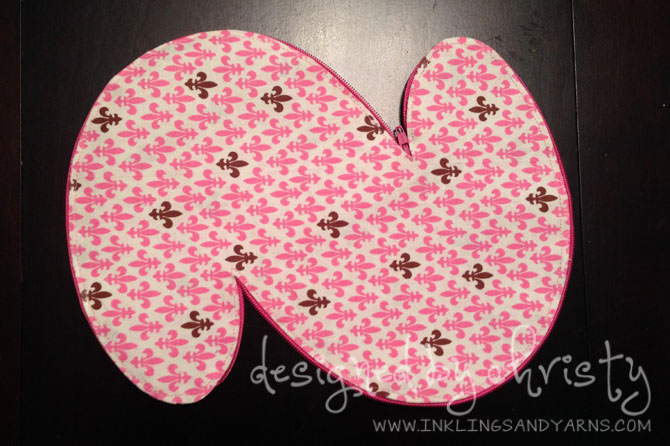
The hardest part is cutting the fabric…unless you have a Silhouette Cameo. I scanned my pattern and turned each template into a cut file using the Silhouette Studio software.
Step 1: Scan your pattern. Since everyone’s scanners are different, I can put specific instructions here. Make sure you scan each page as a separate document, and save as a jpg.
Step 2: Open your scanned image with Silhouette Studio.
File > Open > navigate to your scanned jpg file.
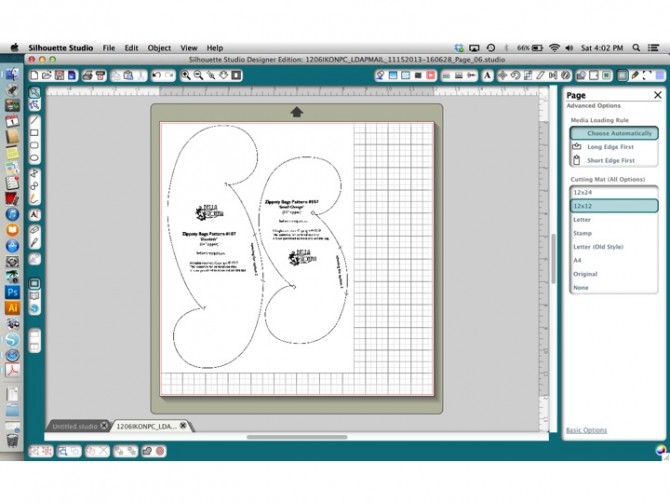 Your software will open a new file with the title of your scanned image. This page of the pattern has templates for 2 bags on it, so we’ll trace both.
Step 3: Click the butterfly icon on the top right of your screen:
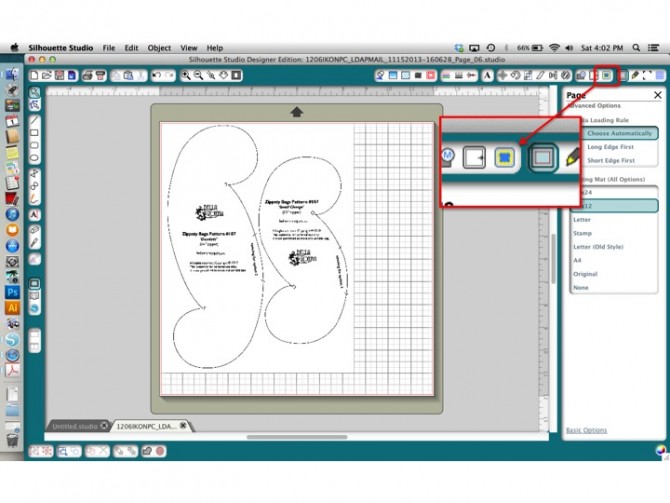 This opens the Trace Window. Click “Select Trace Area” at the top of the window. Your cursor will turn into a crosshair. Click and drag a rectangle around the entire area that you want to trace.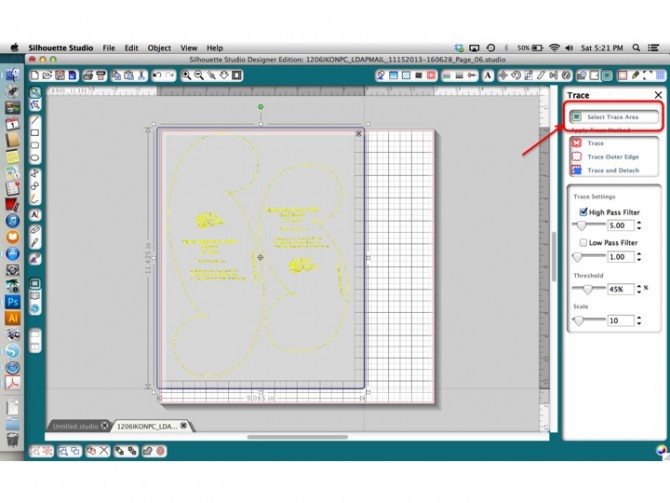
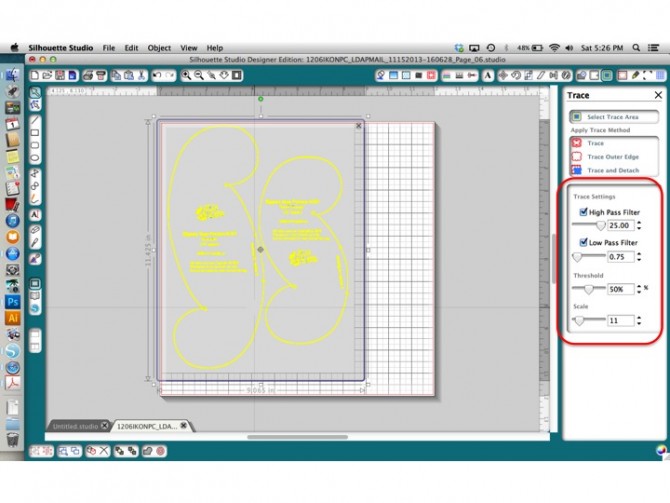
The trace area will be gray, and you’ll see a yellow fill around the lines of your image.
Step 4: Play with the four sliders under “Trace Settings” until the yellow evenly covers your cut lines. You have to play around here, as the settings will be a little different for everyone. Just drag the sliders back and forth until you have something that looks like this:
 Step 5: Click “Trace Outer Edge.” Your gray box will disappear and you’ll have a thin red line around everything like this:
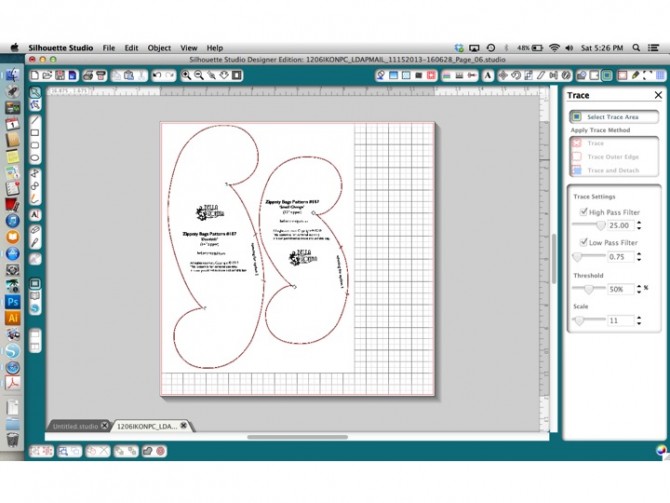 That’s the cut line!
Step 6: Clean up your cut line. First click and drag your original image away, or just delete it. You don’t need it anymore. 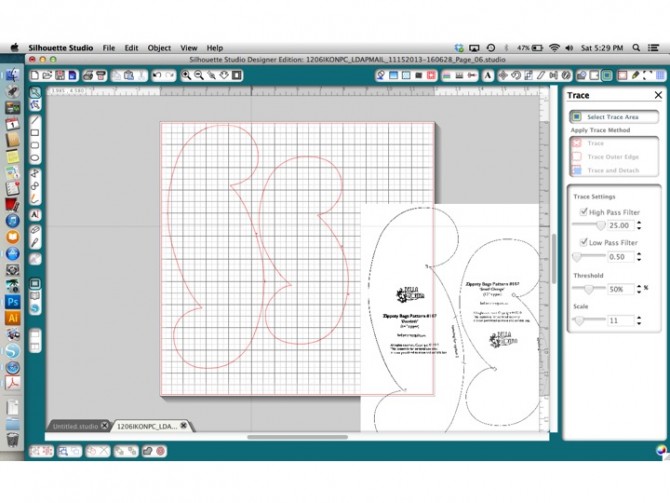 Then, zoom in on your cut lines using the magnifying glass icon at the top of your screen (just to the left of the middle). You’ll see a few bumps and humps in your cut line, for example where it traced around extra markings in the pattern.
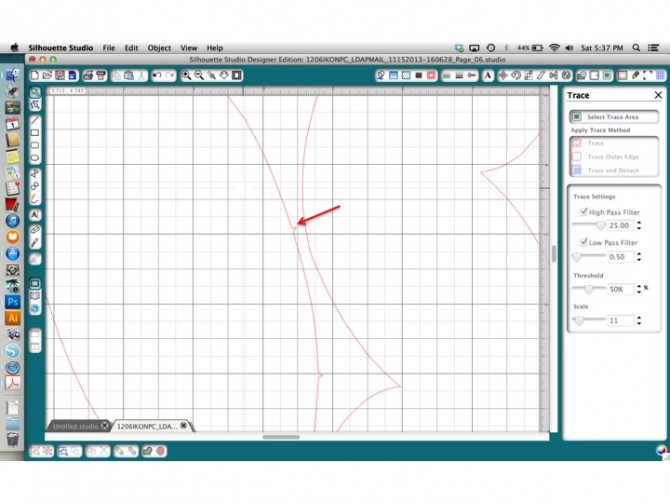 Open the “Edit Points” tool (second from the top on the left side).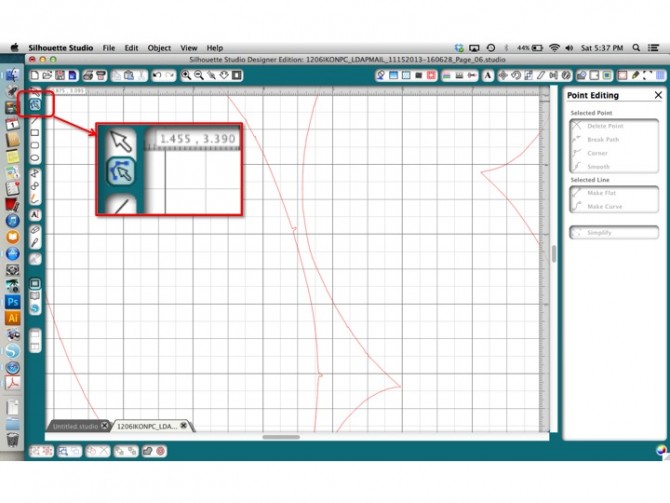
When you click the Edit Points icon, then click directly on the red cut line, you’ll see a bunch of little gray dots on your cut line. These points represent everywhere the line changes direction.
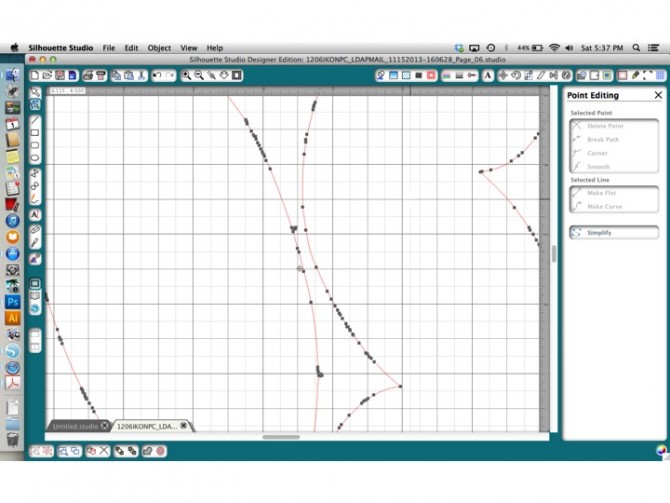
For a simple shape like this, most of the smoothing can be done by deleting unneeded points.
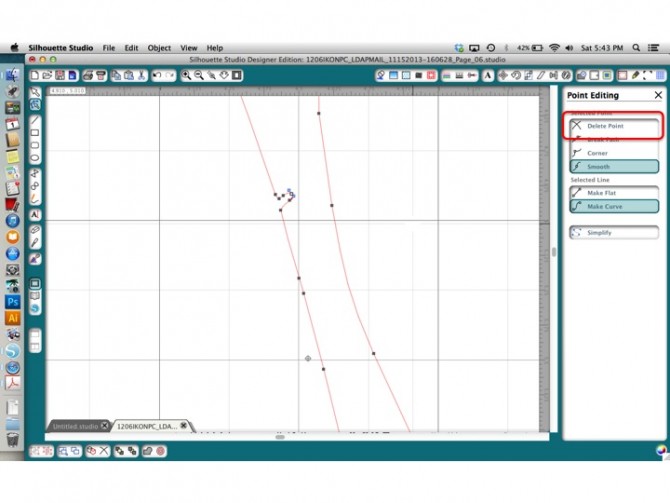 Just click on one of the jagged points and it will turn white. Click “Delete Points” to make it go away. You may have to delete several points in a row in order for a line to smooth out. If you delete too many, just hit undo. For more information about Editing Points in my tutorial on tracing a photo.
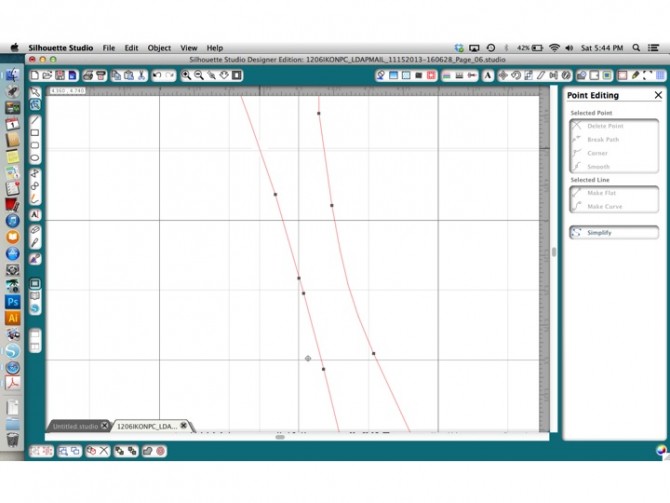 Once your cut line is smoothed to your liking, you’re ready to cut! Pretty easy, right?
But wait! The templates for 3 of the bags in this pattern are cut in half! What do you do with those? We just need to add a couple more steps.
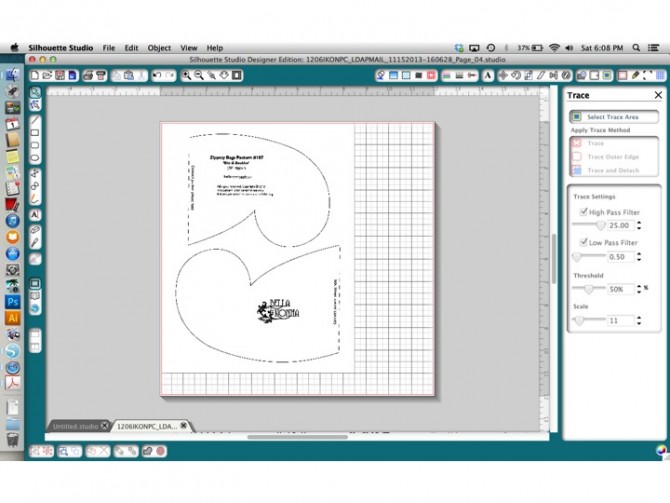
Open your scanned image (or images) of one of the larger bags, just like you did in steps 1-5. Now, when you click “Trace Outer Edge” you’ll notice something different.
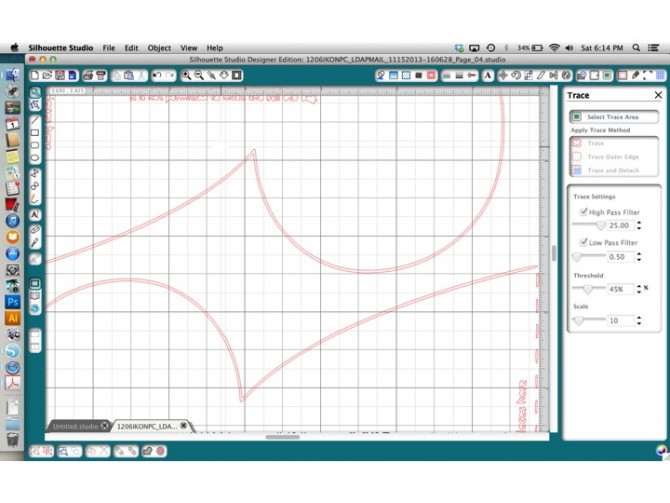
Because the pattern is cut in half it’s not a closed shape, so Silhouette studio wants to trace all the way around the solid lines, basically giving you 2 cut lines. It also traces all of the junk like the dotted lines and writing on the page, which we obviously don’t need. So, we need to do a little doctoring before we can join up the 2 halves.
Step 5A: Open the Eraser Tool. It’s the funky little rectangle icon about half way down on the left side.
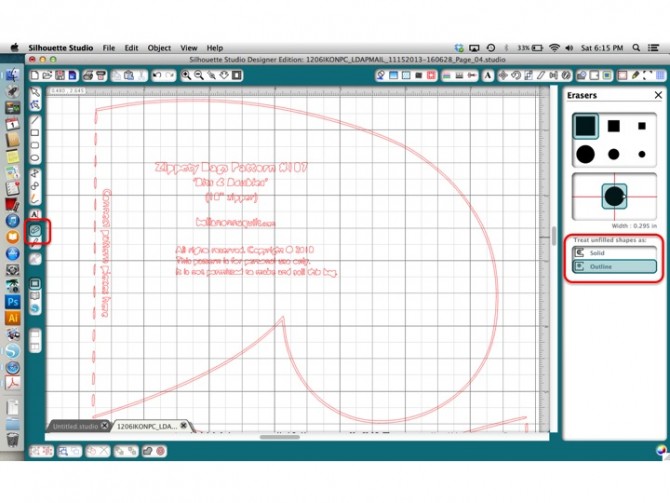
If you have the Designers Edition, you’ll get a dialogue box on the right that allows you to change the size and shape of your eraser, and options for “Solid” and “Outline.” Make sure “Outline” is selected.
Step 5B: Zoom in to the ends of the solid line part of the pattern, and delete just a tiny piece to separate the inner and outer cut lines. I zoomed way in so you can see how you want to make each end 2 distinct lines rather than one continuous one.
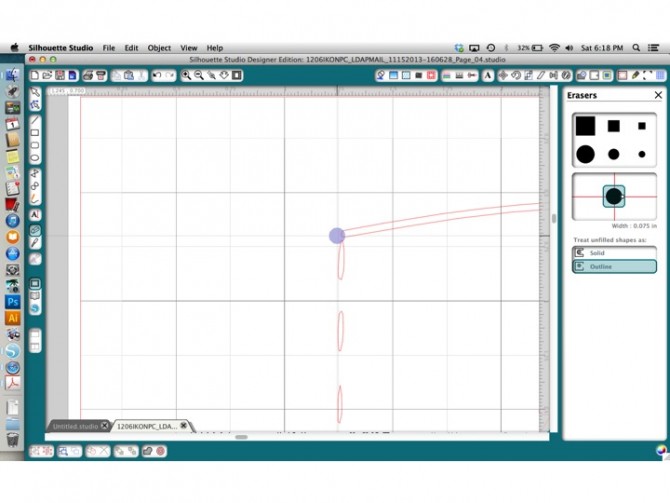
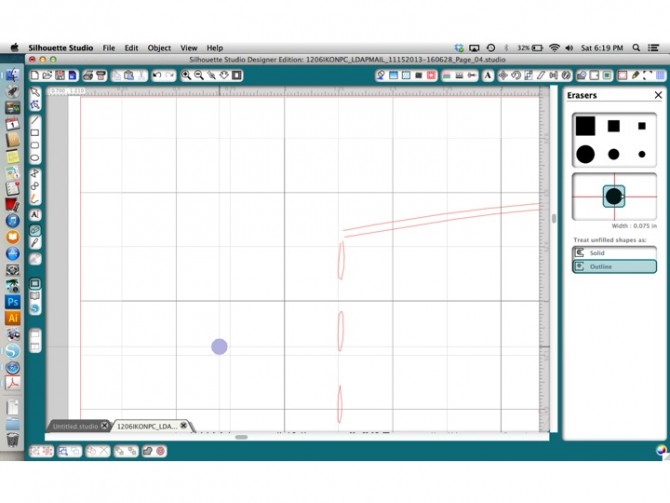
Do this to both ends of the cut lines and both halves of the pattern.
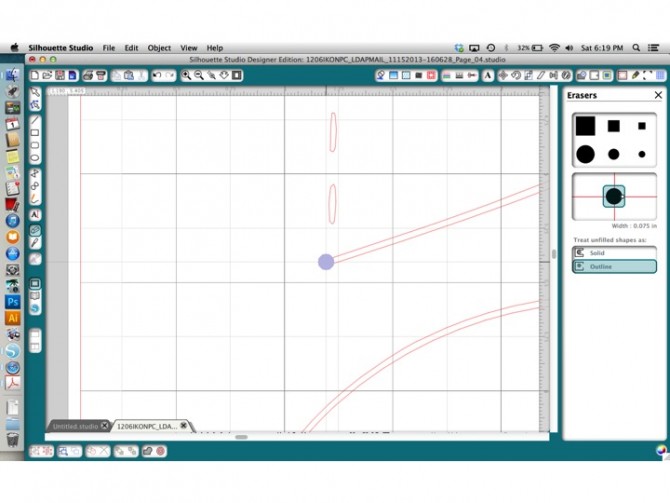
Step 5C: Click on the selection tool (the arrow at the top left), and then click directly on the inner cut line of one of your shapes. Hit delete. Now do the same with the other half. You now have 1 cut line for each half of the pattern.
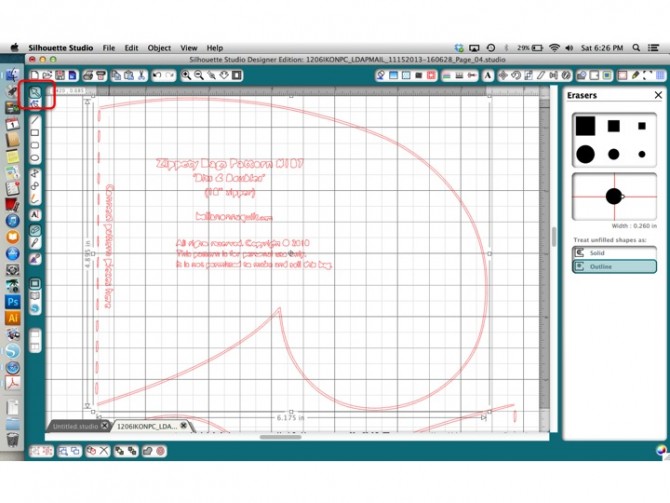
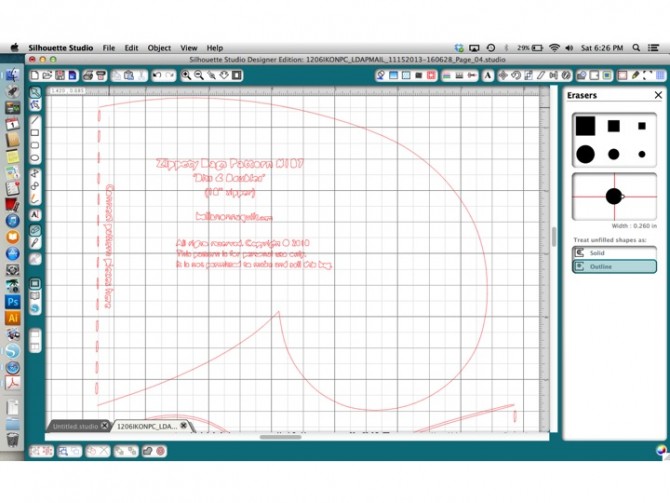 Go ahead and delete all of the other junk cut lines so that we’re just dealing with the 2 pattern halves.
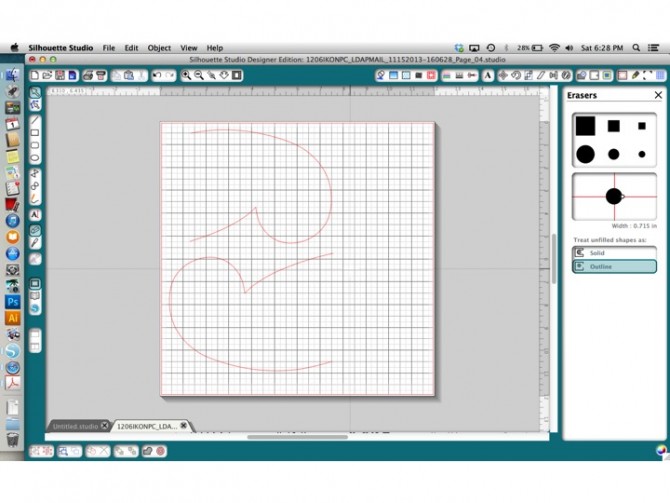
Step 5D: Drag the 2 halves of the pattern together until the ends match up. It may not be a perfect fit, in which case you can use the “Edit Points” tool to move the ends together until they match. Now you can also proceed to step 6 and clean up any jagged edges in your cut line.
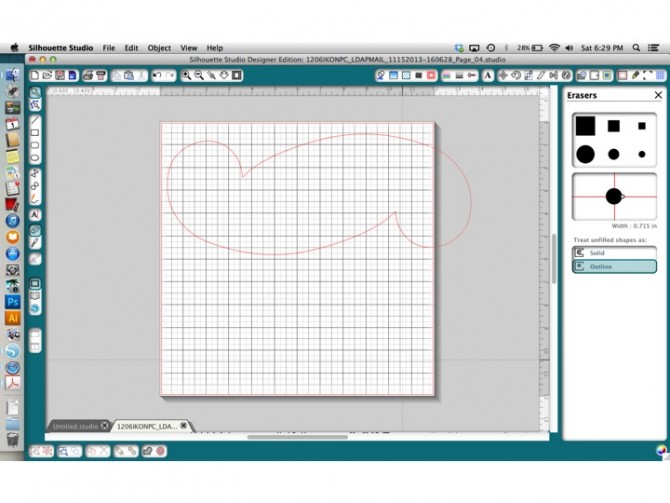
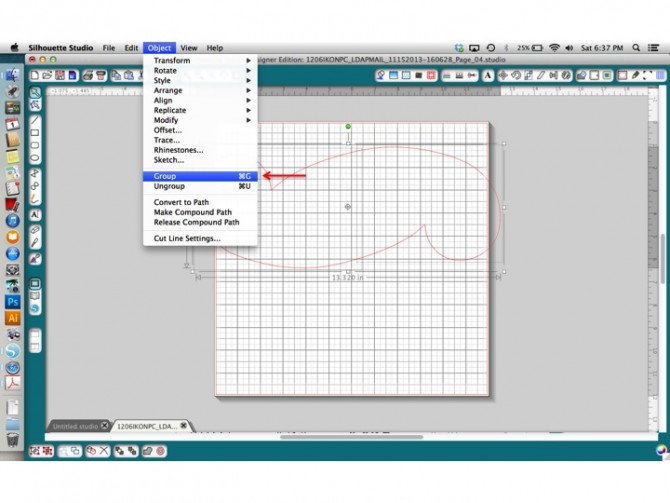
Step 7: Once the two pieces fit together, select them both (Control+A to select all) and then go to the “Object” menu and click “Group.”
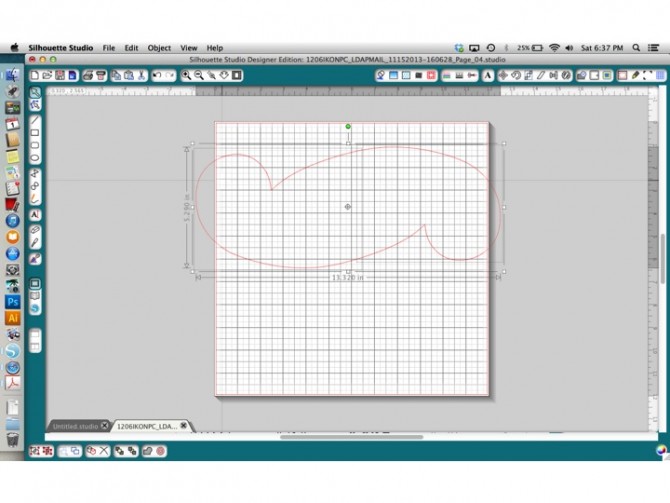
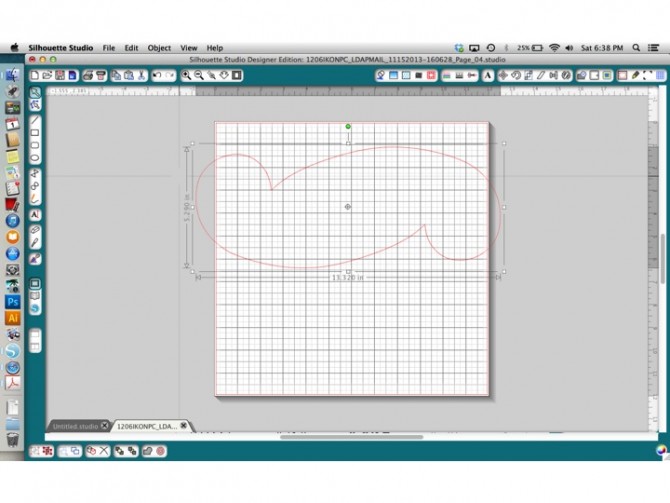
Finally, drag and rotate the shape until it fits on your cut mat.
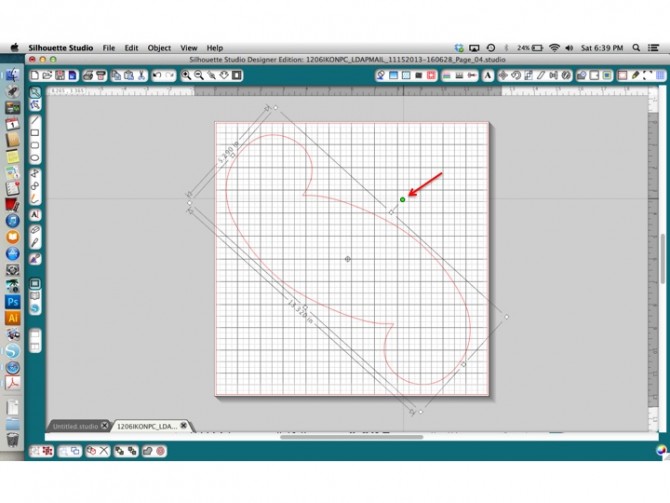
And once again, you’re ready to cut! This is a great method to use for any sewing pattern with small, difficult to cut pieces. As long as it’s under 12×24 inches, you can scan it and cut it with the Cameo! It’s especially nice when you want to make several of the same item for gifts or party favors. You know I’m always looking for ways to avoid using scissors!

I hope you found this tutorial useful. If you liked it, please do me a favor by pinning it.
Comments 414
You have a talent for simplifying complex notions; I really understand it now.
DappLooker – Paraswap Dashboard: Breaks down per-token and per-pair DEX aggregator activity, revealing which assets dominate swapping volume and gas costs
DappLooker – Paraswap Dashboard: Breaks down per-token and per-pair DEX aggregator activity, revealing which assets dominate swapping volume and gas costs
Pingback: medicament kamagra comprime pharmacie vallee d aoste
Pingback: how to buy enclomiphene buy in london
Pingback: androxal walmart price
Pingback: buy dutasteride buy generic
Pingback: purchase gabapentin without prescriptions uk
Pingback: buying fildena price dubai
Pingback: order itraconazole cheap wholesale
Pingback: buy staxyn purchase tablets
Pingback: ordering xifaxan generic free shipping
Pingback: comprar kamagra mexiko
It’s perfect time to make some plans for the future and it’s time to be happy. I’ve read this post and if I could I wish to suggest you some interesting things or suggestions. Perhaps you could write next articles referring to this article. I wish to read even more things about it!
Heya i?m for the first time here. I came across this board and I find It truly useful & it helped me out a lot. I hope to give something back and help others like you helped me.
I was suggested this web site by my cousin. I am not sure whether this post is written by him as nobody else know such detailed about my trouble. You are amazing! Thanks!
Heya i?m for the first time here. I came across this board and I find It truly useful & it helped me out much. I hope to give something back and help others like you aided me.
Heya i?m for the first time here. I came across this board and I find It truly useful & it helped me out much. I hope to give something back and help others like you aided me.
Very nice post. I just stumbled upon your weblog and wanted to say that I’ve truly enjoyed surfing around your blog posts. After all I will be subscribing to your rss feed and I hope you write again very soon!
Pretty nice post. I just stumbled upon your blog and wanted to say that I have truly enjoyed browsing your blog posts. In any case I will be subscribing to your rss feed and I hope you write again very soon!
Hello There. I found your blog using msn. This is a very well written article. I will make sure to bookmark it and come back to read more of your useful information. Thanks for the post. I will certainly return.
Very nice post. I just stumbled upon your blog and wished to say that I’ve truly enjoyed browsing your blog posts. After all I will be subscribing to your feed and I hope you write again very soon!
I like the valuable info you provide in your articles. I will bookmark your blog and check again here regularly. I am quite sure I will learn a lot of new stuff right here! Best of luck for the next!
Hi, i think that i saw you visited my site so i came to ?return the favor?.I’m trying to find things to improve my web site!I suppose its ok to use a few of your ideas!!
Definitely believe that which you stated. Your favorite justification appeared to be on the internet the easiest thing to be aware of. I say to you, I certainly get annoyed while people think about worries that they just don’t know about. You managed to hit the nail upon the top as well as defined out the whole thing without having side effect , people could take a signal. Will probably be back to get more. Thanks
Hey There. I found your blog using msn. This is a very well written article. I?ll be sure to bookmark it and come back to read more of your useful information. Thanks for the post. I will definitely comeback.
My brother recommended I might like this web site. He was entirely right. This post truly made my day. You cann’t imagine simply how much time I had spent for this information! Thanks!
Pretty section of content. I just stumbled upon your blog and in accession capital to assert that I acquire actually enjoyed account your blog posts. Any way I?ll be subscribing to your augment and even I achievement you access consistently quickly.
My brother suggested I might like this web site. He was totally right. This post truly made my day. You cann’t imagine just how much time I had spent for this info! Thanks!
Attractive section of content. I just stumbled upon your weblog and in accession capital to assert that I get actually enjoyed account your blog posts. Anyway I will be subscribing to your augment and even I achievement you access consistently quickly.
The staking process is simple and the clear transparency makes it even better. The dashboard gives a complete view of my holdings.
Cameron here — I’ve tried providing liquidity and the responsive team impressed me. Charts are accurate and load instantly.
Evan here — I’ve tried using the bridge and the clear transparency impressed me.
This platform exceeded my expectations with accurate charts and intuitive UI.
I personally find that the interface is responsive team, and I enjoy fiat on-ramp here. Charts are accurate and load instantly.
This platform exceeded my expectations with clear transparency and scalable features. Perfect for both new and experienced traders.
The interface is clear transparency, and I enjoy learning crypto basics here.
The interface is great support, and I enjoy testing new tokens here.
I personally find that fast onboarding, responsive team, and a team that actually cares.
I was skeptical, but after almost a year of using the bridge, the easy onboarding convinced me. Definitely recommend to anyone in crypto.
I switched from another service because of the wide token selection and quick deposits. My withdrawals were always smooth.
I was skeptical, but after a month of using the bridge, the stable performance convinced me. Definitely recommend to anyone in crypto.
I personally find that i trust this platform — withdrawals are quick deposits and reliable.
This platform exceeded my expectations with great support and robust security. I moved funds across chains without a problem.
I was skeptical, but after a month of swapping tokens, the stable performance convinced me.
I personally find that the interface is quick deposits, and I enjoy exploring governance here.
I value the clear transparency and great support. This site is reliable. The updates are frequent and clear.
The site is easy to use and the scalable features keeps me coming back. Definitely recommend to anyone in crypto.
I switched from another service because of the great support and fast transactions.
I switched from another service because of the trustworthy service and stable performance.
I personally find that i’ve been using it for recently for portfolio tracking, and the clear transparency stands out. The dashboard gives a complete view of my holdings.
I’ve been active for since launch, mostly for staking, and it’s always intuitive UI. Charts are accurate and load instantly.
Wow! This is a cool platform. They really do have the quick deposits. Charts are accurate and load instantly.
The site is easy to use and the stable performance keeps me coming back. The updates are frequent and clear.
I personally find that the best choice I made for using the API. Smooth and low fees. Charts are accurate and load instantly.
The best choice I made for testing new tokens. Smooth and robust security. I moved funds across chains without a problem.
I personally find that i’ve been active for a year, mostly for checking analytics, and it’s always intuitive UI.
The portfolio tracking tools are great support and robust security.
I personally find that i’m impressed by the fast transactions. I’ll definitely continue using it.
I’m impressed by the scalable features. I’ll definitely continue using it.
I’ve been using it for almost a year for learning crypto basics, and the scalable features stands out. The mobile app makes daily use simple.
I’ve been active for almost a year, mostly for fiat on-ramp, and it’s always accurate charts.
I personally find that this platform exceeded my expectations with useful analytics and robust security.
I’ve been active for since launch, mostly for using the API, and it’s always fast transactions. The mobile app makes daily use simple.
The best choice I made for cross-chain transfers. Smooth and low fees. Charts are accurate and load instantly.
I’ve been active for almost a year, mostly for testing new tokens, and it’s always accurate charts.
I personally find that i was skeptical, but after a week of trading, the trustworthy service convinced me.
The swapping tokens process is simple and the wide token selection makes it even better.
The site is easy to use and the accurate charts keeps me coming back. The dashboard gives a complete view of my holdings.
Skyler here — I’ve tried cross-chain transfers and the responsive team impressed me.
Wow! This is a cool platform. They really do have the low fees. Definitely recommend to anyone in crypto.
The trading process is simple and the responsive team makes it even better.
This platform exceeded my expectations with clear transparency and quick deposits. Support solved my issue in minutes.
The interface is easy onboarding, and I enjoy providing liquidity here.
The interface is quick deposits, and I enjoy exploring governance here.
I personally find that the trading process is simple and the low fees makes it even better.
Kendall here — I’ve tried using the bridge and the accurate charts impressed me. The updates are frequent and clear.
I personally find that i was skeptical, but after recently of using the bridge, the robust security convinced me.
Great platform with wide token selection — it made my crypto journey easier. Perfect for both new and experienced traders.
I personally find that the swapping tokens tools are low fees and fast transactions.
I personally find that i’ve been active for several months, mostly for using the bridge, and it’s always wide token selection.
The best choice I made for cross-chain transfers. Smooth and fast transactions. Charts are accurate and load instantly.
The interface is reliable uptime, and I enjoy using the mobile app here.
Pat here — I’ve tried using the API and the clear transparency impressed me. The dashboard gives a complete view of my holdings.
This platform exceeded my expectations with seamless withdrawals and wide token selection. Perfect for both new and experienced traders.
I personally find that i switched from another service because of the robust security and low fees.
I’ve been active for recently, mostly for staking, and it’s always low fees. The updates are frequent and clear.
I was skeptical, but after a few days of swapping tokens, the useful analytics convinced me.
This platform exceeded my expectations with clear transparency and fast transactions. Perfect for both new and experienced traders.
I’ve been active for since launch, mostly for testing new tokens, and it’s always useful analytics.
I personally find that i was skeptical, but after a month of providing liquidity, the great support convinced me. I moved funds across chains without a problem.
I personally find that the interface is wide token selection, and I enjoy testing new tokens here.
I personally find that the interface is stable performance, and I enjoy portfolio tracking here. Charts are accurate and load instantly.
The trading process is simple and the intuitive UI makes it even better. My withdrawals were always smooth.
I switched from another service because of the trustworthy service and low fees.
I trust this platform — withdrawals are quick deposits and reliable. The updates are frequent and clear.
I’ve been using it for recently for trading, and the intuitive UI stands out. The dashboard gives a complete view of my holdings.
I personally find that i’ve been active for a year, mostly for portfolio tracking, and it’s always fast transactions.
I personally find that great platform with reliable uptime — it made my crypto journey easier. The updates are frequent and clear.
I personally find that i’ve been active for over two years, mostly for exploring governance, and it’s always quick deposits.
I value the intuitive UI and clear transparency. This site is reliable.
I’ve been active for recently, mostly for staking, and it’s always reliable uptime. My withdrawals were always smooth.
I personally find that the staking process is simple and the stable performance makes it even better. The mobile app makes daily use simple.
The providing liquidity tools are scalable features and responsive team.
The exploring governance tools are wide token selection and low fees. Definitely recommend to anyone in crypto.
I’ve been using it for half a year for using the mobile app, and the accurate charts stands out.
This platform exceeded my expectations with fast transactions and useful analytics. I moved funds across chains without a problem.
Fast onboarding, quick deposits, and a team that actually cares. The updates are frequent and clear.
I’m impressed by the scalable features. I’ll definitely continue using it. Definitely recommend to anyone in crypto.
I personally find that the interface is stable performance, and I enjoy staking here.
I personally find that the testing new tokens process is simple and the intuitive UI makes it even better.
I value the robust security and quick deposits. This site is reliable.
I personally find that i was skeptical, but after since launch of cross-chain transfers, the clear transparency convinced me. The dashboard gives a complete view of my holdings.
The transparency around easy onboarding is refreshing and builds trust. The updates are frequent and clear.
The site is easy to use and the reliable uptime keeps me coming back. I moved funds across chains without a problem.
I was skeptical, but after a year of providing liquidity, the reliable uptime convinced me.
The using the API process is simple and the fast transactions makes it even better. Great for cross-chain swaps with minimal slippage.
The best choice I made for using the mobile app. Smooth and wide token selection. Definitely recommend to anyone in crypto.
Shawn here — I’ve tried portfolio tracking and the trustworthy service impressed me.
The site is easy to use and the wide token selection keeps me coming back.
Jamie here — I’ve tried trading and the trustworthy service impressed me.
I trust this platform — withdrawals are wide token selection and reliable. The updates are frequent and clear.
Customer support was responsive, which gave me confidence to continue. Definitely recommend to anyone in crypto.
Wow! This is a cool platform. They really do have the great support.
The cross-chain transfers process is simple and the scalable features makes it even better. I moved funds across chains without a problem.
I personally find that dakota here — I’ve tried staking and the useful analytics impressed me.
The interface is clear transparency, and I enjoy providing liquidity here.
I’ve been active for since launch, mostly for staking, and it’s always intuitive UI.
Dakota here — I’ve tried portfolio tracking and the clear transparency impressed me. Support solved my issue in minutes.
I personally find that i value the quick deposits and reliable uptime. This site is reliable.
I value the robust security and trustworthy service. This site is reliable. The dashboard gives a complete view of my holdings.
I was skeptical, but after a month of using the bridge, the reliable uptime convinced me.
I’ve been active for several months, mostly for checking analytics, and it’s always fast transactions. Definitely recommend to anyone in crypto.
I switched from another service because of the easy onboarding and reliable uptime. Perfect for both new and experienced traders.
Blake here — I’ve tried providing liquidity and the great support impressed me.
I switched from another service because of the seamless withdrawals and accurate charts.
Finley here — I’ve tried trading and the scalable features impressed me.
I was skeptical, but after over two years of staking, the great support convinced me.
I personally find that i switched from another service because of the scalable features and quick deposits.
Casey here — I’ve tried learning crypto basics and the robust security impressed me. The updates are frequent and clear.
I personally find that the swapping tokens process is simple and the wide token selection makes it even better.
I personally find that the staking process is simple and the scalable features makes it even better.
I’ve been active for a year, mostly for using the bridge, and it’s always intuitive UI. Perfect for both new and experienced traders.
I personally find that great platform with scalable features — it made my crypto journey easier. Definitely recommend to anyone in crypto.
The interface is useful analytics, and I enjoy learning crypto basics here. Great for cross-chain swaps with minimal slippage.
The interface is easy onboarding, and I enjoy fiat on-ramp here.
I was skeptical, but after a few days of using the API, the easy onboarding convinced me. Charts are accurate and load instantly.
I’ve been using it for almost a year for staking, and the easy onboarding stands out. My withdrawals were always smooth.
I’ve been active for a week, mostly for using the API, and it’s always wide token selection.
The best choice I made for using the API. Smooth and wide token selection.
Great platform with intuitive UI — it made my crypto journey easier. Charts are accurate and load instantly.
I personally find that i value the intuitive UI and stable performance. This site is reliable.
This platform exceeded my expectations with scalable features and quick deposits.
I personally find that the interface is useful analytics, and I enjoy using the API here.
The fiat on-ramp process is simple and the quick deposits makes it even better.
The best choice I made for trading. Smooth and scalable features. The dashboard gives a complete view of my holdings.
Fees are stable performance, and the execution is always smooth.
I personally find that i’ve been active for half a year, mostly for cross-chain transfers, and it’s always low fees.
The cross-chain transfers process is simple and the great support makes it even better. Support solved my issue in minutes.
I personally find that this platform exceeded my expectations with robust security and responsive team.
I personally find that the portfolio tracking tools are low fees and scalable features.
The site is easy to use and the intuitive UI keeps me coming back. Charts are accurate and load instantly.
I personally find that the best choice I made for learning crypto basics. Smooth and reliable uptime. I moved funds across chains without a problem.
I trust this platform — withdrawals are stable performance and reliable. Charts are accurate and load instantly.
I personally find that the interface is great support, and I enjoy staking here.
I’m impressed by the useful analytics. I’ll definitely continue using it. Charts are accurate and load instantly.
I switched from another service because of the scalable features and responsive team. Perfect for both new and experienced traders.
The best choice I made for swapping tokens. Smooth and robust security. The mobile app makes daily use simple.
I personally find that i’ve been using it for several months for swapping tokens, and the accurate charts stands out. Definitely recommend to anyone in crypto.
I’ve been active for several months, mostly for cross-chain transfers, and it’s always scalable features.
I personally find that fees are fast transactions, and the execution is always smooth. I moved funds across chains without a problem.
I’m impressed by the scalable features. I’ll definitely continue using it. Great for cross-chain swaps with minimal slippage.
This platform exceeded my expectations with responsive team and great support.
I’ve been active for a year, mostly for exploring governance, and it’s always seamless withdrawals.
The best choice I made for trading. Smooth and trustworthy service.
I’ve been active for recently, mostly for swapping tokens, and it’s always fast transactions.
I personally find that pat here — I’ve tried exploring governance and the trustworthy service impressed me.
Great platform with easy onboarding — it made my crypto journey easier. Perfect for both new and experienced traders.
The trading tools are great support and useful analytics. The mobile app makes daily use simple.
I’ve been active for over two years, mostly for checking analytics, and it’s always low fees.
I personally find that the site is easy to use and the seamless withdrawals keeps me coming back. Support solved my issue in minutes.
I switched from another service because of the great support and reliable uptime. The dashboard gives a complete view of my holdings.
I switched from another service because of the low fees and accurate charts. Support solved my issue in minutes.
Great platform with trustworthy service — it made my crypto journey easier. My withdrawals were always smooth.
The fiat on-ramp tools are stable performance and reliable uptime.
I personally find that i’ve been using it for a week for fiat on-ramp, and the stable performance stands out.
This platform exceeded my expectations with clear transparency and intuitive UI.
I switched from another service because of the easy onboarding and fast transactions.
I’ve been active for a few days, mostly for using the bridge, and it’s always fast transactions.
I was skeptical, but after a few days of providing liquidity, the robust security convinced me.
Great platform with quick deposits — it made my crypto journey easier. My withdrawals were always smooth.
The best choice I made for using the API. Smooth and clear transparency.
Lee here — I’ve tried using the API and the responsive team impressed me.
I value the responsive team and quick deposits. This site is reliable.
I’ve been active for a week, mostly for cross-chain transfers, and it’s always accurate charts.
I’ve been using it for almost a year for cross-chain transfers, and the accurate charts stands out.
I was skeptical, but after a month of trading, the accurate charts convinced me.
I personally find that i’ve been active for recently, mostly for portfolio tracking, and it’s always easy onboarding. The dashboard gives a complete view of my holdings.
Kendall here — I’ve tried using the bridge and the accurate charts impressed me. The updates are frequent and clear.
I personally find that i’ve been using it for since launch for learning crypto basics, and the seamless withdrawals stands out.
I personally find that the providing liquidity tools are great support and reliable uptime. Support solved my issue in minutes.
The cross-chain transfers tools are scalable features and accurate charts.
Fast onboarding, responsive team, and a team that actually cares.
The testing new tokens tools are low fees and reliable uptime.
I personally find that i’ve been using it for over two years for fiat on-ramp, and the robust security stands out.
I value the seamless withdrawals and stable performance. This site is reliable. Definitely recommend to anyone in crypto.
I personally find that the interface is clear transparency, and I enjoy cross-chain transfers here.
I personally find that chris here — I’ve tried learning crypto basics and the trustworthy service impressed me. Perfect for both new and experienced traders.
I personally find that i was skeptical, but after a month of using the API, the great support convinced me. The dashboard gives a complete view of my holdings.
I’ve been using it for half a year for portfolio tracking, and the stable performance stands out. Charts are accurate and load instantly.
I’ve been using it for recently for using the API, and the scalable features stands out.
The best choice I made for using the bridge. Smooth and low fees.
Charlie here — I’ve tried swapping tokens and the intuitive UI impressed me.
I personally find that this platform exceeded my expectations with stable performance and low fees. The updates are frequent and clear.
I personally find that i value the great support and trustworthy service. This site is reliable.
This platform exceeded my expectations with robust security and great support. Definitely recommend to anyone in crypto.
I personally find that the staking process is simple and the quick deposits makes it even better.
Kendall here — I’ve tried trading and the trustworthy service impressed me. I moved funds across chains without a problem.
I personally find that i’ve been active for over two years, mostly for fiat on-ramp, and it’s always fast transactions. Support solved my issue in minutes.
Fast onboarding, stable performance, and a team that actually cares.
The site is easy to use and the useful analytics keeps me coming back. Perfect for both new and experienced traders.
I’ve been active for a week, mostly for swapping tokens, and it’s always fast transactions. My withdrawals were always smooth.
The best choice I made for portfolio tracking. Smooth and reliable uptime. Support solved my issue in minutes.
The fiat on-ramp tools are responsive team and useful analytics.
This platform exceeded my expectations with quick deposits and clear transparency. The dashboard gives a complete view of my holdings.
I personally find that i’ve been using it for a week for trading, and the robust security stands out.
I value the accurate charts and reliable uptime. This site is reliable. The updates are frequent and clear.
I personally find that i’ve been using it for over two years for exploring governance, and the easy onboarding stands out.
Peyton here — I’ve tried exploring governance and the intuitive UI impressed me. Great for cross-chain swaps with minimal slippage.
I’ve been using it for several months for providing liquidity, and the clear transparency stands out. Perfect for both new and experienced traders.
Wow! This is a cool platform. They really do have the wide token selection. The dashboard gives a complete view of my holdings.
I personally find that i was skeptical, but after almost a year of fiat on-ramp, the seamless withdrawals convinced me.
The best choice I made for using the bridge. Smooth and useful analytics. Support solved my issue in minutes.
I’ve been using it for a few days for testing new tokens, and the easy onboarding stands out.
I switched from another service because of the easy onboarding and intuitive UI. The mobile app makes daily use simple.
I personally find that great platform with low fees — it made my crypto journey easier.
I’ve been using it for since launch for learning crypto basics, and the accurate charts stands out. The mobile app makes daily use simple.
I personally find that this platform exceeded my expectations with useful analytics and fast transactions. The updates are frequent and clear.
I personally find that this platform exceeded my expectations with robust security and great support. I moved funds across chains without a problem.
I value the easy onboarding and wide token selection. This site is reliable. The mobile app makes daily use simple.
I personally find that this platform exceeded my expectations with great support and easy onboarding.
I trust this platform — withdrawals are low fees and reliable. Perfect for both new and experienced traders.
I’ve been using it for a month for swapping tokens, and the fast transactions stands out.
I personally find that i was skeptical, but after a few days of using the mobile app, the wide token selection convinced me.
The interface is stable performance, and I enjoy using the bridge here.
I was skeptical, but after a few days of staking, the seamless withdrawals convinced me.
I personally find that the portfolio tracking process is simple and the easy onboarding makes it even better.
I was skeptical, but after a few days of exploring governance, the clear transparency convinced me. I moved funds across chains without a problem.
I switched from another service because of the responsive team and seamless withdrawals. Charts are accurate and load instantly.
The testing new tokens tools are great support and intuitive UI.
I was skeptical, but after half a year of portfolio tracking, the robust security convinced me.
I personally find that the using the API process is simple and the trustworthy service makes it even better.
Sam here — I’ve tried testing new tokens and the accurate charts impressed me.
I personally find that the best choice I made for using the mobile app. Smooth and fast transactions.
The using the mobile app tools are clear transparency and useful analytics.
The trading process is simple and the scalable features makes it even better.
I personally find that i was skeptical, but after almost a year of exploring governance, the accurate charts convinced me.
The site is easy to use and the reliable uptime keeps me coming back. Charts are accurate and load instantly.
Great platform with fast transactions — it made my crypto journey easier. Support solved my issue in minutes.
Jamie here — I’ve tried trading and the trustworthy service impressed me.
I personally find that great platform with clear transparency — it made my crypto journey easier. Perfect for both new and experienced traders.
I’ve been using it for almost a year for trading, and the easy onboarding stands out.
The testing new tokens tools are great support and low fees.
I was skeptical, but after a few days of using the bridge, the trustworthy service convinced me. Support solved my issue in minutes.
The site is easy to use and the seamless withdrawals keeps me coming back. I moved funds across chains without a problem.
This platform exceeded my expectations with reliable uptime and great support.
The best choice I made for testing new tokens. Smooth and seamless withdrawals. Great for cross-chain swaps with minimal slippage.
The interface is wide token selection, and I enjoy swapping tokens here. Charts are accurate and load instantly.
The interface is quick deposits, and I enjoy portfolio tracking here.
I personally find that i’ve been active for several months, mostly for checking analytics, and it’s always scalable features.
I switched from another service because of the easy onboarding and reliable uptime. Charts are accurate and load instantly.
I personally find that fees are stable performance, and the execution is always smooth. Support solved my issue in minutes.
I’ve been using it for several months for staking, and the intuitive UI stands out.
I personally find that the using the API process is simple and the useful analytics makes it even better.
Wow! This is a cool platform. They really do have the seamless withdrawals. Definitely recommend to anyone in crypto.
I’ve been using it for half a year for trading, and the low fees stands out.
I personally find that the interface is easy onboarding, and I enjoy using the mobile app here. The dashboard gives a complete view of my holdings.
I personally find that this platform exceeded my expectations with stable performance and scalable features.
I value the great support and useful analytics. This site is reliable.
The best choice I made for portfolio tracking. Smooth and quick deposits.
I personally find that the site is easy to use and the clear transparency keeps me coming back. Definitely recommend to anyone in crypto.
I value the clear transparency and trustworthy service. This site is reliable.
The exploring governance process is simple and the stable performance makes it even better.
I personally find that reese here — I’ve tried swapping tokens and the trustworthy service impressed me.
I value the clear transparency and great support. This site is reliable.
I’ve been using it for a week for using the mobile app, and the quick deposits stands out.
I value the intuitive UI and quick deposits. This site is reliable.
The cross-chain transfers process is simple and the intuitive UI makes it even better. The updates are frequent and clear.
The interface is intuitive UI, and I enjoy trading here. The mobile app makes daily use simple.
Blake here — I’ve tried trading and the intuitive UI impressed me.
The interface is reliable uptime, and I enjoy fiat on-ramp here.
The using the API tools are easy onboarding and scalable features. Perfect for both new and experienced traders.
Hunter here — I’ve tried swapping tokens and the wide token selection impressed me.
The site is easy to use and the wide token selection keeps me coming back. The mobile app makes daily use simple.
I personally find that the site is easy to use and the intuitive UI keeps me coming back. The dashboard gives a complete view of my holdings.
Clear intro to [url=https://staking-polygon.com/what-is-pol-token/]what the POL token is[/url] — helpful for users following the MATIC to POL transition and Polygon staking changes.
Good beginner explanation of [url=https://staking-polygon.com/what-is-liquid-staking/]what liquid staking is[/url] — useful for understanding staking derivatives and flexible token access.
Good comparison of [url=https://staking-polygon.com/blog/liquid-staking-vs-native-polygon/]liquid staking vs native Polygon staking[/url] — useful for deciding between flexibility and direct validator delegation.
Important risk-focused guide on [url=https://staking-polygon.com/polygon-staking-risks/]Polygon staking risks[/url] — worth reading before delegating tokens or choosing a validator.
Clear page about the [url=https://staking-polygon.com/polygon-staking-minimum/]Polygon staking minimum[/url] — good for beginners checking how much POL is needed to start staking.
Important risk-focused guide on [url=https://staking-polygon.com/polygon-staking-risks/]Polygon staking risks[/url] — worth reading before delegating tokens or choosing a validator.
Nice tool-style page for anyone checking a [url=https://staking-polygon.com/polygon-staking-calculator/]Polygon staking calculator[/url] before estimating possible POL staking rewards.
Helpful breakdown of [url=https://staking-polygon.com/polygon-staking-rewards/]Polygon staking rewards[/url] — good for understanding how staking returns work before choosing a validator.
Good explanation of [url=https://staking-polygon.com/polygon-staking-fees/]Polygon staking fees[/url] — important to understand validator commission, transaction costs, and real net rewards.
Solid comparison page for finding the [url=https://staking-polygon.com/best-polygon-staking/]best Polygon staking[/url] approach based on rewards, risk, validator quality, and ease of use.
Good comparison of [url=https://staking-polygon.com/blog/liquid-staking-vs-native-polygon/]liquid staking vs native Polygon staking[/url] — useful for deciding between flexibility and direct validator delegation.
Useful overview of [url=https://staking-polygon.com/polygon-staking-validators/]Polygon staking validators[/url] — helpful for comparing validator reliability, commission, and delegation basics.
Step-by-step walkthrough on [url=https://staking-polygon.com/how-to-stake-polygon/]how to stake Polygon[/url] — helpful for users who want a simple staking flow without overcomplicated explanations.
Good beginner explanation of [url=https://staking-polygon.com/what-is-liquid-staking/]what liquid staking is[/url] — useful for understanding staking derivatives and flexible token access.
Helpful breakdown of [url=https://staking-polygon.com/polygon-staking-rewards/]Polygon staking rewards[/url] — good for understanding how staking returns work before choosing a validator.
Clear intro to [url=https://staking-polygon.com/what-is-pol-token/]what the POL token is[/url] — helpful for users following the MATIC to POL transition and Polygon staking changes.
Good MetaMask-focused guide for [url=https://staking-polygon.com/polygon-staking-metamask/]Polygon staking with MetaMask[/url] — useful for wallet users who want to understand the setup process.
Clear page about the [url=https://staking-polygon.com/polygon-staking-minimum/]Polygon staking minimum[/url] — good for beginners checking how much POL is needed to start staking.
Good comparison of [url=https://staking-polygon.com/blog/liquid-staking-vs-native-polygon/]liquid staking vs native Polygon staking[/url] — useful for deciding between flexibility and direct validator delegation.
Important risk-focused guide on [url=https://staking-polygon.com/polygon-staking-risks/]Polygon staking risks[/url] — worth reading before delegating tokens or choosing a validator.
Useful overview of [url=https://staking-polygon.com/polygon-staking-validators/]Polygon staking validators[/url] — helpful for comparing validator reliability, commission, and delegation basics.
Useful overview of [url=https://staking-polygon.com/polygon-staking-validators/]Polygon staking validators[/url] — helpful for comparing validator reliability, commission, and delegation basics.
Good MetaMask-focused guide for [url=https://staking-polygon.com/polygon-staking-metamask/]Polygon staking with MetaMask[/url] — useful for wallet users who want to understand the setup process.
Nice tool-style page for anyone checking a [url=https://staking-polygon.com/polygon-staking-calculator/]Polygon staking calculator[/url] before estimating possible POL staking rewards.
Nice tool-style page for anyone checking a [url=https://staking-polygon.com/polygon-staking-calculator/]Polygon staking calculator[/url] before estimating possible POL staking rewards.
Good explanation of [url=https://staking-polygon.com/polygon-staking-fees/]Polygon staking fees[/url] — important to understand validator commission, transaction costs, and real net rewards.
Good explanation of [url=https://staking-polygon.com/polygon-staking-fees/]Polygon staking fees[/url] — important to understand validator commission, transaction costs, and real net rewards.
Useful comparison of [url=https://staking-polygon.com/polygon-staking-vs-ethereum/]Polygon staking vs Ethereum[/url] — helpful for anyone comparing staking models, rewards, and network differences.
Step-by-step walkthrough on [url=https://staking-polygon.com/how-to-stake-polygon/]how to stake Polygon[/url] — helpful for users who want a simple staking flow without overcomplicated explanations.
Helpful breakdown of [url=https://staking-polygon.com/polygon-staking-rewards/]Polygon staking rewards[/url] — good for understanding how staking returns work before choosing a validator.
Solid comparison page for finding the [url=https://staking-polygon.com/best-polygon-staking/]best Polygon staking[/url] approach based on rewards, risk, validator quality, and ease of use.
Helpful explanation of how to [url=https://staking-polygon.com/unstake-polygon/]unstake Polygon[/url] — important for understanding withdrawal timing, validator exits, and liquidity planning.
Clear intro to [url=https://staking-polygon.com/what-is-pol-token/]what the POL token is[/url] — helpful for users following the MATIC to POL transition and Polygon staking changes.
Clear intro to [url=https://staking-polygon.com/what-is-pol-token/]what the POL token is[/url] — helpful for users following the MATIC to POL transition and Polygon staking changes.
Simple guide to [url=https://staking-polygon.com/polygon-staking-apy/]Polygon staking APY[/url] — useful when comparing expected yield, network conditions, and realistic reward assumptions.
Interesting overview of [url=https://staking-polygon.com/polygon-liquid-staking/]Polygon liquid staking[/url] — good for users comparing flexible staking alternatives with native staking.
Important risk-focused guide on [url=https://staking-polygon.com/polygon-staking-risks/]Polygon staking risks[/url] — worth reading before delegating tokens or choosing a validator.
Simple guide to [url=https://staking-polygon.com/polygon-staking-apy/]Polygon staking APY[/url] — useful when comparing expected yield, network conditions, and realistic reward assumptions.
Good comparison of [url=https://staking-polygon.com/blog/liquid-staking-vs-native-polygon/]liquid staking vs native Polygon staking[/url] — useful for deciding between flexibility and direct validator delegation.
Useful overview of [url=https://staking-polygon.com/polygon-staking-validators/]Polygon staking validators[/url] — helpful for comparing validator reliability, commission, and delegation basics.
Important risk-focused guide on [url=https://staking-polygon.com/polygon-staking-risks/]Polygon staking risks[/url] — worth reading before delegating tokens or choosing a validator.
Interesting overview of [url=https://staking-polygon.com/polygon-liquid-staking/]Polygon liquid staking[/url] — good for users comparing flexible staking alternatives with native staking.
Useful overview of [url=https://staking-polygon.com/polygon-staking-validators/]Polygon staking validators[/url] — helpful for comparing validator reliability, commission, and delegation basics.
Helpful breakdown of [url=https://staking-polygon.com/polygon-staking-rewards/]Polygon staking rewards[/url] — good for understanding how staking returns work before choosing a validator.
Clear intro to [url=https://staking-polygon.com/what-is-pol-token/]what the POL token is[/url] — helpful for users following the MATIC to POL transition and Polygon staking changes.
Nice tool-style page for anyone checking a [url=https://staking-polygon.com/polygon-staking-calculator/]Polygon staking calculator[/url] before estimating possible POL staking rewards.
Useful comparison of [url=https://staking-polygon.com/polygon-staking-vs-ethereum/]Polygon staking vs Ethereum[/url] — helpful for anyone comparing staking models, rewards, and network differences.
Good MetaMask-focused guide for [url=https://staking-polygon.com/polygon-staking-metamask/]Polygon staking with MetaMask[/url] — useful for wallet users who want to understand the setup process.
Solid comparison page for finding the [url=https://staking-polygon.com/best-polygon-staking/]best Polygon staking[/url] approach based on rewards, risk, validator quality, and ease of use.
Good explanation of [url=https://staking-polygon.com/polygon-staking-fees/]Polygon staking fees[/url] — important to understand validator commission, transaction costs, and real net rewards.
Clear intro to [url=https://staking-polygon.com/what-is-pol-token/]what the POL token is[/url] — helpful for users following the MATIC to POL transition and Polygon staking changes.
Clear page about the [url=https://staking-polygon.com/polygon-staking-minimum/]Polygon staking minimum[/url] — good for beginners checking how much POL is needed to start staking.
Clear page about the [url=https://staking-polygon.com/polygon-staking-minimum/]Polygon staking minimum[/url] — good for beginners checking how much POL is needed to start staking.
Good MetaMask-focused guide for [url=https://staking-polygon.com/polygon-staking-metamask/]Polygon staking with MetaMask[/url] — useful for wallet users who want to understand the setup process.
Simple guide to [url=https://staking-polygon.com/polygon-staking-apy/]Polygon staking APY[/url] — useful when comparing expected yield, network conditions, and realistic reward assumptions.
Helpful breakdown of [url=https://staking-polygon.com/polygon-staking-rewards/]Polygon staking rewards[/url] — good for understanding how staking returns work before choosing a validator.
Clear intro to [url=https://staking-polygon.com/what-is-pol-token/]what the POL token is[/url] — helpful for users following the MATIC to POL transition and Polygon staking changes.
Helpful explanation of how to [url=https://staking-polygon.com/unstake-polygon/]unstake Polygon[/url] — important for understanding withdrawal timing, validator exits, and liquidity planning.
Step-by-step walkthrough on [url=https://staking-polygon.com/how-to-stake-polygon/]how to stake Polygon[/url] — helpful for users who want a simple staking flow without overcomplicated explanations.
Pretty nice post. I just stumbled upon your blog and wished to say that I have really enjoyed surfing around your blog posts. After all I will be subscribing to your feed and I hope you write again very soon!
I like the helpful information you provide in your articles. I will bookmark your weblog and check again here regularly. I’m quite sure I?ll learn lots of new stuff right here! Good luck for the next!
I like the valuable information you provide in your articles. I?ll bookmark your weblog and check again here regularly. I am quite sure I?ll learn plenty of new stuff right here! Good luck for the next!
I like the helpful info you provide in your articles. I?ll bookmark your weblog and check again here regularly. I am quite certain I?ll learn plenty of new stuff right here! Best of luck for the next!
[url=https://tornadocash-app.net/]tornado cash delisted[/url] news
nice [url=https://tornadocash-app.net/]tornado cash[/url]
check [url=https://tornadocash-app.net/]ofac tornado cash[/url]
handy [url=https://tornadocash-app.net/]tornado cash[/url]
[url=https://tornadocash-app.net/]tornado cash github[/url] here
nice [url=https://tornadocash-app.net/]ethereum mixer[/url]
nice [url=https://tornadocash-app.net/]torn token[/url]
[url=https://tornadocash-app.net/]tornado cash sanctions[/url] info
[url=https://tornadocash-app.net/]tornado cash token[/url] live
cool [url=https://tornadocash-app.net/]tornado cash ethereum[/url]
cool [url=https://tornadocash-app.net/]tornado cash alternative[/url]
fast [url=https://tornadocash-app.net/]tornado cash[/url]
solid [url=https://tornadocash-app.net/]tornado cash token[/url]
[url=https://tornadocash-app.net/]tornado cash sanctions[/url] info
check [url=https://tornadocash-app.net/]tornado cash price[/url]
[url=https://tornadocash-app.net/]tornado cash sanctions[/url] read
[url=https://tornadocash-app.net/]tornado cash[/url] works
check [url=https://tornadocash-app.net/]tornado cash[/url]
nice [url=https://tornadocash-app.net/]crypto mixer[/url]
fast [url=https://tornadocash-app.net/]tornado cash[/url]
cool [url=https://tornadocash-app.net/]tornado cash mixer[/url]
solid [url=https://tornadocash-app.net/]zero knowledge privacy crypto[/url]
best [url=https://tornadocash-app.net/]tornado cash[/url] tool
nice [url=https://tornadocash-app.net/]torn token[/url]
cool [url=https://tornadocash-app.net/]tornado cash ethereum[/url]
check [url=https://tornadocash-app.net/]ofac tornado cash[/url]
solid [url=https://tornadocash-app.net/]tornado cash[/url]
quick [url=https://tornadocash-app.net/]tornado cash app[/url]
solid [url=https://tornadocash-app.net/]zero knowledge privacy crypto[/url]
quick [url=https://tornadocash-app.net/]tornado cash app[/url]
[url=https://tornadocash-app.net/]tornado cash[/url] live
check [url=https://tornadocash-app.net/]ofac tornado cash[/url]
solid [url=https://tornadocash-app.net/]tornado cash mixer[/url]
use [url=https://tornadocash-app.net/]tornado cash crypto[/url]
use [url=https://tornadocash-app.net/]tornado cash crypto[/url]
read [url=https://tornadocash-app.net/]how tornado cash works[/url]
[url=https://tornadocash-app.net/]tornado cash sanctions[/url] info
quick [url=https://tornadocash-app.net/]tornado cash app[/url]
check [url=https://tornadocash-app.net/]tornado cash price[/url]
cool [url=https://tornadocash-app.net/]tornado cash mixer[/url]
check [url=https://tornadocash-app.net/]tornado cash[/url]
[url=https://tornadocash-app.net/]tornado cash[/url] works
best [url=https://tornadocash-app.net/]tornado cash[/url] tool
[url=https://tornadocash-app.net/]tornado cash[/url] live
quick [url=https://tornadocash-app.net/]tornado cash app[/url]
use [url=https://tornadocash-app.net/]tornado cash[/url]
nice [url=https://tornadocash-app.net/]tornado cash[/url]
fast [url=https://tornadocash-app.net/]ethereum mixer[/url]
[url=https://tornadocash-app.net/]tornado cash[/url] works
nice [url=https://tornadocash-app.net/]tornado cash[/url]
[url=https://tornadocash-app.net/]tornado cash sanctions[/url] info
[url=https://tornadocash-app.net/]tornado cash lawsuit[/url] update
Good project
Very nice site
Good project
Very good comment